
Is Your Business Ready for Salesforce? A Guide for Growth-Oriented Companies
Is Your Business Ready for Salesforce?
What Does "Salesforce Ready" Really Mean?
Beyond Readiness: The Power of a Strategic Partnership
- Define Clear Objectives: Translate your business goals into concrete Salesforce strategies.
- Tailor Solutions: Leverage custom Salesforce solutions and CRM customization to fit your exact needs, rather than a one-size-fits-all approach.
- Ensure Seamless Data Migration: Safely and accurately transfer your valuable historical data to ensure continuity and accuracy.
- Facilitate User Adoption: Provide training and support to ensure your team embraces the new system.
- Plan for Scalability: Design a Salesforce instance that grows with your business, anticipating future needs and integrations.
Socium Partners: Your Guide to Salesforce Transformation
At Socium Partners, we understand that successful Salesforce adoption is about more than just technology – it’s about partnership. We work closely with growth-oriented businesses, from Missouri to the farthest reaches of the USA, to unlock the full potential of the Salesforce platform. As a dedicated Salesforce development company, our focus is on delivering tailored Salesforce consulting services and expert Salesforce development that aligns directly with your strategic objectives. Whether you’re just beginning to explore Salesforce or looking to optimize your existing instance, we’re here to guide you. Our team of certified professionals is committed to transforming your operations, enhancing customer relationships, and helping your business thrive.Your Strategic Advantage: Why Partnering for Power Apps Matters
It’s not solely about technical expertise; it’s about a holistic approach that deeply understands your business objectives. A reputable partner will:
- Uncover Latent Opportunities: They don’t just build what you request; they help you identify processes ripe for automation and digital transformation that you might not have even considered. Their cross-industry experience brings a fresh, valuable perspective. Design for Robustness & Security: While Power Apps is low-code, enterprise-level solutions demand robust architecture, meticulous data governance, and stringent security protocols. A professional partner ensures your Power Apps are built to scale, are secure, and comply with all relevant industry regulations.
- Bridge Technical Complexities: While accessible, complex integrations, advanced data modelling, and performance optimization often require a deeper technical understanding. A partner fills this gap, ensuring your applications are both powerful and performant.
- Drive Adoption & Provide Training: An expertly built application is ineffective if not utilized. A proficient consulting partner emphasizes user experience (UX) design and provides comprehensive training and ongoing support, ensuring seamless adoption across your organization.
- Offer Enduring Support & Evolution: Business needs are dynamic. A dedicated partner offers continuous support, maintenance, and future enhancements, ensuring your Power Apps continue to meet your evolving requirements and leverage new platform capabilities.
Socium Partners: Your Trusted Power Apps Development Company USA
We don’t just build applications; we forge strategic partnerships, working collaboratively with your teams to grasp your business intricacies and deliver tailored Power Apps solutions that drive measurable impact.
When you hire Power Apps developers USA from Socium Partners, you gain:
- Deep Industry Insight: Our team possesses a nuanced understanding of various sectors, allowing us to speak your language and design solutions that truly resonate with your operational realities. Proven Methodologies: We combine our extensive Power Apps expertise with a structured development approach, ensuring projects are delivered efficiently, within budget, and to your precise specifications.
- A Relentless Focus on ROI: We are committed to delivering tangible returns on your technology investment. Our solutions are meticulously designed to optimize processes, reduce costs, and accelerate your path to greater efficiency and profitability.
Ready to explore how custom Power Apps can revolutionize your business? Contact us today for a personalized consultation.
Why a Power Apps Partner is Your Business Game-Changer

Is Your Business Ready for Salesforce? A Guide for Growth-Oriented Companies
Why Finding a Power Apps Partner is Your Business Game-Changer
Imagine Sarah, a project manager at a rapidly growing logistics company in Chicago. Every week, she wrestled with cumbersome spreadsheets to track deliveries, often finding outdated information that led to costly delays. Her team was frustrated, clients were occasionally underserved, and the manual process stifled any real-time decision-making. What if Sarah could ditch those spreadsheets and, with a few clicks and drags, build a custom app on her tablet that was updated in real-time as drivers made deliveries, automatically flagged exceptions, and even optimized routes?
Beyond the Hype: The Tangible Value of Power Apps Development
Let’s explore how strategic Power Apps development is making a measurable difference in critical industries nationwide:
Streamlining Operations: Manufacturing & Logistics
You’ve likely heard terms like “low-code” or “no-code,” but what do these truly signify for your organization’s bottom line?
Power Apps development empowers individuals and teams to create custom applications with minimal to no traditional coding, utilizing intuitive drag-and-drop interfaces and pre-built templates. This directly translates into:
- Accelerated Innovation Cycles: Imagine transforming a promising idea for a new internal tool into a fully functional application in days, not months. Power Apps drastically reduces development timelines, allowing you to iterate and deploy solutions faster than ever before.
- Optimized Resource Allocation: By minimizing the need for highly specialized, costly developers for every custom solution, Power Apps significantly reduces development and ongoing maintenance expenditures. You can achieve more with your existing resources.
- Precision-Fit Solutions, Not Generic Software: Off-the-shelf software often forces you to conform your unique business processes to its limitations. Power Apps developers USA enable you to build applications that perfectly align with your specific workflows, eliminating inefficiencies and significantly boosting productivity.
- Seamless Enterprise Integration: Power Apps operates as a cohesive part of your digital ecosystem. It integrates effortlessly with your existing Microsoft 365 environment (SharePoint, Excel, Teams, Dynamics 365) and a vast array of third-party data sources. This means your new applications can seamlessly exchange data across your entire tech stack, providing a unified operational view.
- Empowered “Citizen Developers”: Your subject matter experts often possess the most profound understanding of your operational pain points. Power Apps allows them to evolve into “citizen developers,” building targeted solutions that directly address their needs, fostering an organic culture of innovation from within your organization.
Power Apps in Action: Real-World Transformations Across Industries
Let’s explore how strategic Power Apps development is making a measurable difference in critical industries nationwide:
Streamlining Operations: Manufacturing & Logistics
For manufacturing and logistics companies across the USA, optimizing every step of the production and supply chain process is paramount. Power Apps offers a fresh perspective on tackling traditional challenges:
- Shop Floor Data & Quality Assurance (Beyond Manual Processes): Replace manual data entry and clipboards with tablet-based Power Apps. Production line workers can input real-time data on machine performance, defect rates, and material consumption. This data can instantly update dashboards, alerting supervisors to anomalies and enabling immediate corrective action. Think of an app that guides operators through quality checks, captures photos of defects, and automatically routes issues to maintenance, reducing human error and accelerating problem resolution.
- Proactive Maintenance & Asset Management: Envision a Power App that integrates with IoT sensors on your machinery. This app could display real-time machine health, predict potential failures based on anomalies, and automatically generate work orders for maintenance teams, complete with digital checklists and parts inventories. This proactive approach minimizes downtime and extends equipment lifespan.
- Enhanced Supply Chain Visibility: A Power App can revolutionize inventory management. Warehouse staff can use mobile devices to scan barcodes, update stock levels, track goods movement, and even initiate automated reorder requests when thresholds are met. This provides real-time, accurate inventory data, reducing stockouts and optimizing warehousing space—a significant upgrade from cumbersome spreadsheets.
Elevating Efficiency: Finance & Professional Services
The finance industry, with its intricate regulations and critical data, might seem an unlikely candidate for low-code solutions. Yet, Power Apps is proving its immense value:
- Digitized Expense Reporting & Approvals: For many firms, expense reporting remains a multi-step, paper-intensive ordeal. A Power App can fully digitize this process. Employees can snap photos of receipts, categorize expenses, and submit reports from their mobile devices. The app can then route approvals through custom workflows, integrating with existing accounting systems for faster processing and fewer errors. This saves time and provides real-time visibility into spending patterns.
- Accelerated Client Onboarding & KYC (Know Your Customer): The initial stages of client engagement can be bogged down by paperwork and manual verification. A Power App can create an intuitive, guided onboarding experience for new clients, securely collecting necessary documents and data. It can then automate the routing of this information for KYC checks, integrating with internal compliance systems and significantly accelerating client acceptance while ensuring regulatory adherence. Streamlined Anomaly Reporting & Internal Audits: While not a standalone AI solution, Power Apps can serve as a critical front-end for flagging potential issues. Employees reviewing transactions could use a Power App to quickly log suspicious activities, attach relevant documentation, and escalate them to the appropriate team for investigation. The app could even be designed to highlight transactions that meet predefined “red flag” criteria, enhancing human oversight and accelerating the response to potential discrepancies.
Your Strategic Advantage: Why Partnering for Power Apps Matters
It’s not solely about technical expertise; it’s about a holistic approach that deeply understands your business objectives. A reputable partner will:
- Uncover Latent Opportunities: They don’t just build what you request; they help you identify processes ripe for automation and digital transformation that you might not have even considered. Their cross-industry experience brings a fresh, valuable perspective. Design for Robustness & Security: While Power Apps is low-code, enterprise-level solutions demand robust architecture, meticulous data governance, and stringent security protocols. A professional partner ensures your Power Apps are built to scale, are secure, and comply with all relevant industry regulations.
- Bridge Technical Complexities: While accessible, complex integrations, advanced data modelling, and performance optimization often require a deeper technical understanding. A partner fills this gap, ensuring your applications are both powerful and performant.
- Drive Adoption & Provide Training: An expertly built application is ineffective if not utilized. A proficient consulting partner emphasizes user experience (UX) design and provides comprehensive training and ongoing support, ensuring seamless adoption across your organization.
- Offer Enduring Support & Evolution: Business needs are dynamic. A dedicated partner offers continuous support, maintenance, and future enhancements, ensuring your Power Apps continue to meet your evolving requirements and leverage new platform capabilities.
Codeplateau: Your Trusted Power Apps Development Company USA
For businesses across the USA ready to harness the transformative power of Microsoft Power Apps, choosing the right partner is the pivotal next step. At Codeplateau, we are a leading Power Apps development company USA that understands the diverse challenges and opportunities within the American market.
We don’t just build applications; we forge strategic partnerships, working collaboratively with your teams to grasp your business intricacies and deliver tailored Power Apps solutions that drive measurable impact.
When you hire Power Apps developers USA from Codeplateau, you gain:
- Deep Industry Insight: Our team possesses a nuanced understanding of various sectors, allowing us to speak your language and design solutions that truly resonate with your operational realities.
Proven Methodologies: We combine our extensive Power Apps expertise with a structured development approach, ensuring projects are delivered efficiently, within budget, and to your precise specifications. - A Relentless Focus on ROI: We are committed to delivering tangible returns on your technology investment. Our solutions are meticulously designed to optimize processes, reduce costs, and accelerate your path to greater efficiency and profitability.
The future of business agility is here, powered by the thoughtful application of technology. Let Codeplateau be your trusted guide, helping you unlock the full potential of Power Apps and transform your operations from the inside out.
Ready to explore how custom Power Apps can revolutionize your business? Contact us today for a personalized consultation.
The Precision Edge: Power BI Rejection PPM Dashboard

The Precision Edge: Rejection PPM Dashboard in Power BI for Manufacturing Quality
I. Introduction
Imagine a manufacturing floor where every defect tells a story, not just of a fault, but of why it happened, where it originated, and what specific action can prevent it from recurring. For too long, “quality control” often meant reactive firefighting – counting rejections, then painstakingly digging through data to find answers. This traditional approach isn’t just inefficient; it’s a silent drain on profitability, wasting precious time, and delaying crucial decisions.
But what if you could shift from reaction to anticipation? What if your quality data, sitting right there in your SAP BW system, could instantly translate into clear, actionable insights? This is exactly the transformation a Rejection PPM Dashboard in Power BI delivers. It’s not just a reporting tool; it’s your command center for proactive quality management, empowering manufacturing leaders to drive efficiency, cut costs, and uphold brand reputation with unprecedented speed and clarity.
II. What Exactly is Rejection PPM Dashboard?
“PPM” stands for Parts Per Million, a critical metric quantifying the number of defective units per million produced. But in isolation, PPM is just a number. A truly effective rejection PPM dashboard goes far beyond basic reporting. It’s a dynamic, visual command center that empowers your management to:
- Quickly pinpoint problem areas: See where quality issues are flaring up at a glance, eliminating the need for cumbersome manual reports.
- Drill into specifics: Investigate manufacturing plants, production lines, and even individual products, getting to the heart of an issue in seconds.
- Uncover root causes: Move beyond symptoms to understand the fundamental why behind rejections, allowing for permanent fixes rather than temporary band-aids.
- Drive corrective action: Make data-backed decisions that lead to real, measurable improvements, transforming reactive firefighting into a proactive strategy.
The best part? This entire system is fed live from your existing SAP BW system, ensuring you’re always working with the freshest, most accurate data. This means no more waiting for weekly reports, no more data reconciliation, just pure, actionable insight.
III. The Power of Insight: Revolutionizing Quality Control with Power BI
Here are some critical dashboards that spearhead this kind of transformation:
1. Strategic Supplier Performance: Identifying Strengths and Weaknesses
A common challenge for large manufacturers is effectively managing supplier quality without overwhelming manual labor. Traditionally, this involved days spent aggregating supplier defect rates from various systems.
A robust rejection PPM dashboard includes crucial components like:
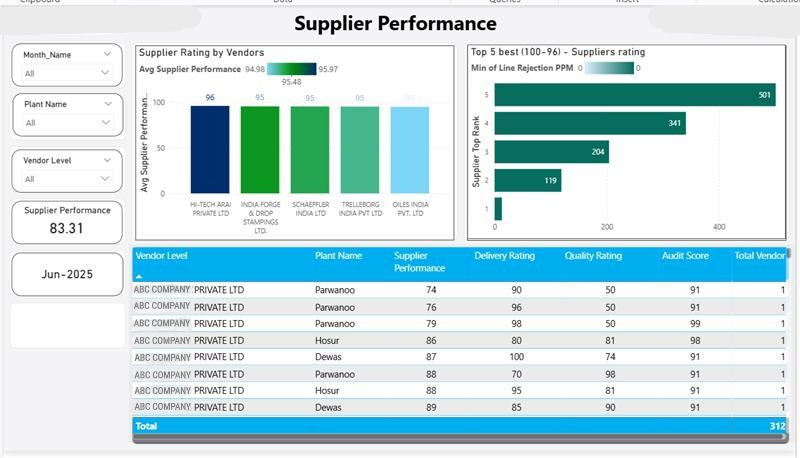
- Supplier Performance Dashboard: This visual provides an immediate overview of your best-performing suppliers based on the lowest rejection PPM. It allows procurement and quality teams to quickly identify reliable partners, streamlining future sourcing decisions, and recognizing strong performers.
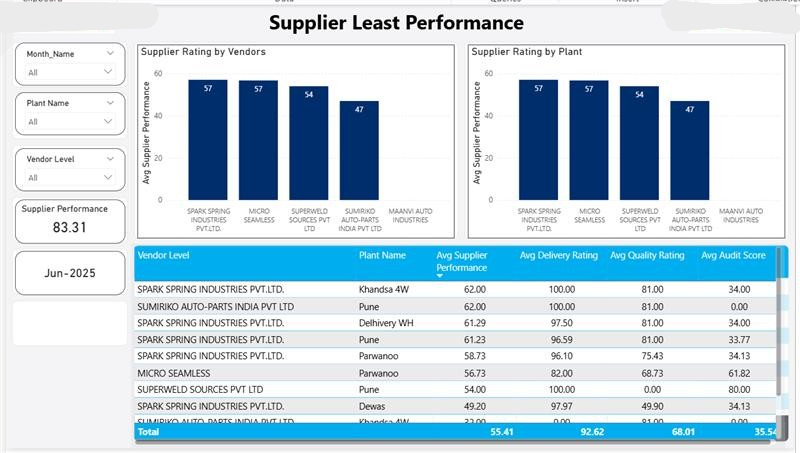
- Supplier Least Performance Dashboard: Conversely, this dashboard highlights suppliers with the highest rejection PPM. This isn’t about blame; it’s about precision. Instead of general concerns, organizations can now identify specific problematic suppliers impacting their production, initiating targeted discussions and corrective action plans without delay. This eliminates hours of manual data compilation, allowing teams to focus on problem-solving.
Understanding who or what is performing poorly is only half the battle. The real breakthrough comes from understanding why. The traditional process often involves multiple department handoffs and extensive manual research to determine root causes for rejections.
An interactive Power BI dashboard with advanced drill-down capabilities can change this:
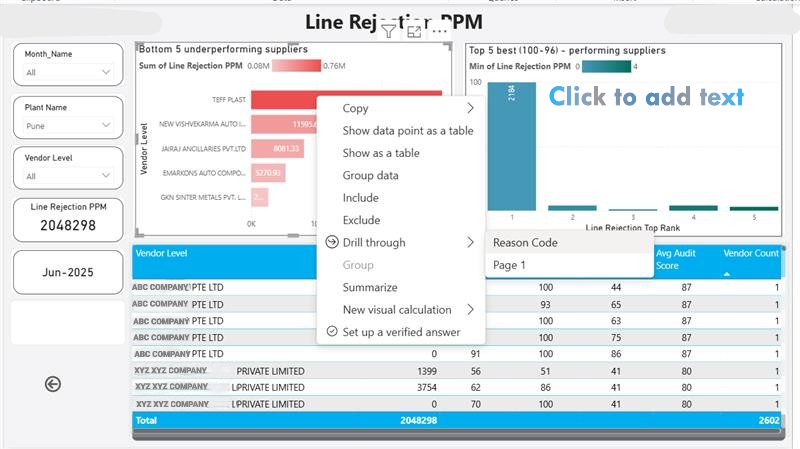
- Drill-Down Action with Variable Reason Codes: This dashboard allows management and quality engineers to click on a high-PPM plant or product and instantly drill down to see the exact rejection reasons associated with those defects. This isn’t a static report; it’s a dynamic investigation tool.
- Various Reasons with Code Details: Beyond just category, this visual presents granular details, allowing teams to see the specific defect codes (e.g., “Material Imperfection – Batch 123”, “Operator Error – Shift C”). This level of detail eliminates ambiguity and accelerates the root cause analysis (RCA) process. For instance, if a specific material defect code repeatedly appears, it immediately flags a supplier or process issue, saving countless hours previously spent sifting through reports and interviewing personnel. This direct link between symptoms and causes significantly increases problem-solving efficiency.
Even within a single supplier relationship, performance can vary significantly across different product lines or components. Manufacturing organizations need a way to monitor these subtle shifts to prevent major issues.
A targeted trend analysis dashboard is essential here:
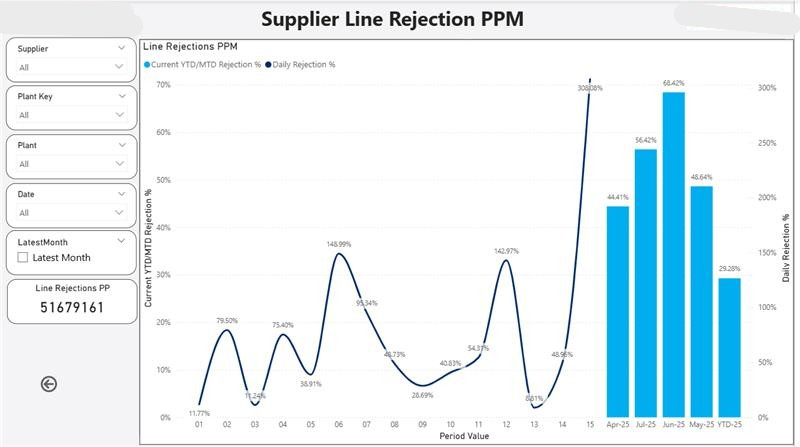
- Supplier Line Rejection PPM Graph:
This dynamic line chart tracks the rejection PPM for specific product lines or components supplied by key vendors over time. It allows organizations to spot emerging trends – a gradual increase in rejections from a particular supplier line, for example – before it escalates into a major disruption. This proactive monitoring can significantly reduce reactive quality crises, saving substantial costs related to rework, scrap, and production delays. It transforms supplier management from reactive crisis control to proactive partnership.
The Data Backbone: Why SAP BW Data is Key
All these powerful insights don’t come from magic; they come from reliable, structured data. This rejection PPM dashboard is meticulously powered by live, accurate data directly from your SAP BW (Business Warehouse) system. This means:
- Real-time Accuracy: Your dashboard reflects the current state of operations, not outdated spreadsheets, ensuring decisions are based on the latest facts.
- No Manual Work: Say goodbye to time-consuming, error-prone manual data uploads, freeing up valuable personnel for analysis and improvement.
- Seamless Integration: Power BI connects directly to your existing SAP BW queries, ensuring a smooth, reliable data flow that aligns with your ERP system, providing a single source of truth.
Why This Dashboard Matters to Manufacturing Leadership
For decision-makers navigating the complexities of manufacturing, this dashboard isn’t just a nice-to-have; it’s a strategic imperative. Organizations that implement such solutions typically see a dramatic reduction in manual reporting time, a significant increase in the efficiency of their quality teams, and a newfound ability for management to make informed, data-driven decisions swiftly.
- Too much data, not enough insight: Summarizes key quality metrics visually and intuitively.
- Delayed Root Cause Analysis (RCA): Allows instant drill-down to pinpoint problems quickly.
- Supplier accountability issues: Ranks suppliers by actual defect data, fostering objective review.
- Poor visibility across plants: Compares plant and line-level performance with ease.
- No feedback loop on improvements:Tracks progress over time via trends, measuring initiative impact.
Final Thoughts: Your Next Step Towards Quality Excellence
The Rejection PPM Dashboard is more than just a report; it’s a powerful decision-making engine. It empowers:
- Operations teams to detect and resolve issues faster, reducing scrap and rework.
- Procurement to manage supplier quality proactively, optimizing supply chain reliability.
- Leadership to track critical quality KPIs and ensure targets are met, fostering a culture of continuous improvement across the entire organization.
With SAP BW as the robust data backbone and Power BI as the intuitive visual brain, this dashboard brings unparalleled clarity, speed, and actionable insight to your entire quality control strategy.
At Codeplateau, we specialize in Power BI dashboard development and Power BI consulting services for the manufacturing sector. We help companies like yours leverage their SAP BW data to create intelligent, custom solutions that drive real results.
Empowering Beyond Automation: The Evolving Power Platform

Empowering Beyond Automation: The Evolving Power Platform
Empowering Beyond Automation: The Evolving Edge of Power Platform
The Microsoft Power Platform has moved far beyond its initial perception as a simple suite for basic apps and workflow automation. Today, it stands as a cornerstone of genuine digital transformation, enabling organizations to build highly sophisticated, AI-driven, and deeply integrated business solutions. At Codeplateau, we’re not just offering Power Platform development services; we’re guiding businesses across the USA to leverage its cutting-edge capabilities and redefine what’s possible.
Beyond the Basics: Power Platform's Unique Capabilities
Forget generic “efficiency gains.” The true power of the Power Platform lies in its ability to foster fusion development, seamlessly blend low-code agility with pro-code extensibility, and embed intelligent automation directly into the fabric of your operations.
1. The Rise of Fusion Development and Hyper-Personalization:
The future of application development is collaborative. Power Platform facilitates “fusion teams” – where business users (citizen developers) with deep domain knowledge collaborate directly with professional developers.
- Citizen Developers’ Empowerment: Through intuitive drag-and-drop interfaces and AI-powered assistance (like Copilot for Power Apps and Power Automate), business users can rapidly prototype and deploy departmental solutions that address immediate needs. This drastically reduces the IT backlog and empowers line-of-business owners.
- Pro-Code Extensibility:
For complex logic, custom connectors, or integration with legacy systems, professional developers can inject their expertise using traditional coding languages (like C#, JavaScript) and Azure services. This means no “low-code cliffs” – solutions can scale in complexity and performance without being re-platformed.
- Hyper-Personalized User Experiences:
This fusion allows for the creation of highly personalized applications. Imagine a field service app that not only captures data but intelligently surfaces relevant historical customer information, predicts potential equipment failures using AI Builder, and even suggests the next best action, all tailored to the specific technician and client.
Navigating the Advanced Power Platform Landscape
At Codeplateau, our expertise in Power Platform development services extends beyond basic implementation. We specialize in architecting and delivering advanced solutions that truly transform your business:
- Strategic Advisory & Roadmap Development:
We work with you to identify high-impact use cases, develop a comprehensive Power Platform strategy, and build a phased roadmap for implementation that aligns with your business goals.
- Complex Solution Architecture:
Designing robust and scalable Power Platform solutions that leverage the full spectrum of its capabilities, including AI Builder, Dataverse, Azure integration, and custom connectors.
- Fusion Team Enablement:
We help organizations establish and train fusion teams, fostering collaboration between IT and business units to accelerate solution delivery and drive widespread adoption.
- Governance and Center of Excellence (CoE) Setup:
Ensuring your Power Platform environment is secure, compliant, and scalable, with proper governance frameworks and a Power Platform Center of Excellence (CoE) to foster innovation and best practices.
- Continuous Innovation & Optimization:
Our engagement doesn’t end at deployment. We provide ongoing support, monitor performance, and identify opportunities for continuous optimization and feature enhancements, ensuring your Power Platform investment delivers sustained value.
The Microsoft Power Platform is no longer just a tool for departmental apps; it’s a strategic platform for enterprise-wide digital transformation, intelligent automation, and next-generation business applications.
Ready to unlock the truly transformative potential of the Power Platform for your organization?
Connect with Codeplateau today to explore how our expert Power Platform developers can architect and implement your most ambitious digital initiatives.
Choosing the Right Salesforce Implementation Partner: 7 Critical Questions to Ask

Choosing the Right Salesforce Implementation Partner: 7 Critical Questions to Ask
I. Introduction: The Vision vs. The Reality
You’ve invested in Salesforce Development and implementation, or you’re about to. You envision a seamless ecosystem, empowered teams, and data-driven decisions that propel your business forward. Yet, for many organizations, the reality of Salesforce implementation can feel far from this vision – often leading to underutilized features, frustrating user experiences, and a murky return on investment. The market is saturated with Salesforce implementation companies, making the choice even more difficult. This isn’t just about selecting a vendor; it’s about choosing a strategic ally. At CodePlateau, we understand that Salesforce is more than just a software deployment; it’s a profound business transformation. Our recent elevation to a certified Salesforce Partner underscores our commitment to not just implement, but to innovate alongside you, ensuring your Salesforce ecosystem drives tangible, real business growth. This guide will equip you with 7 transformative questions designed to help you identify a Salesforce partner company that will truly unlock your platform’s exponential power.II. The “Growth Gap”: Why Traditional Implementations Fall Short
Many Salesforce implementation partners focus solely on the technical build. They handle configurations, data migration, and go-live. But is that enough to bridge the “growth gap” – the difference between having Salesforce and actually growing from it? Without a strategic, end-to-end approach, Salesforce can feel like another operational cost, rather than a profit center. Common pitfalls we consistently observe include:- Underwhelming Adoption: Teams revert to old habits because the new system isn’t intuitive or integrated into their workflow.
- Fragmented Processes: Instead of streamlining, Salesforce adds complexity if not aligned with your unique operational flow.
- Elusive ROI: The initial investment feels heavy, but the measurable benefits remain unclear.
- Post-Launch Paralysis: Once live, the support disappears, leaving you to navigate the optimizations alone.
III. Your Blueprint for Success: 7 Critical Questions for a Growth-Driven Partnership
IV. CodePlateau: Your Strategic Salesforce Partner for Real Growth
As a certified Salesforce Partner, CodePlateau is more than just one of the many Salesforce implementation companies. We blend deep technical expertise with a proactive, humanized approach, ensuring your Salesforce investment drives significant ROI and sustainable business growth. We are committed to an end-to-end partnership that:- Prioritizes your measurable success
- Helps you define clear business objectives
- Strategize for maximum impact
- Optimize processes and user adoption
- Measure tangible results
V. Don’t Just Implement. Innovate.
The choice of your Salesforce implementation partner is a pivotal decision that will shape your business’s future. By asking these transformative questions, you’ll be able to differentiate between mere vendors and true strategic partners who are invested in your success. Choose a partner who sees your vision and has the methodology to turn it into a reality. Ready to transcend basic implementation and build a Salesforce strategy that truly accelerates your business growth and delivers measurable ROI?Beyond Chatbots: Salesforce AgentForce in Manufacturing

Beyond Chatbots: Salesforce AgentForce in Manufacturing
I. Modern Manufacturing: The Need for Intelligent Automation
Manufacturers are facing unprecedented pressures – including supply chain volatility, labour shortages, and rising customer expectations for personalised products and faster delivery. Add to that the rising costs and complexities of modern businesses, they need to evolve rapidly – and rigid, outdated traditional automation systems aren’t enough. Solutions like intelligent automation offer greater flexibility, adaptability, and real-time decision-making capabilities. Historically, manufacturers have relied on automation (from Henry Ford’s car production assembly to automated jets of the 20th century and production robots today). However, intelligent automation, with its AI-powered capabilities to automate processes and improve efficiency, is becoming the new normal and transforming the way we approach development.Introducing AgentForce:
Agentforce is a platform of autonomous AI agents that can perform various business functions like sales, marketing, and customer support. Unlike traditional chatbots or copilots, Agentforce agents can operate independently, retrieving relevant data, creating action plans, and executing tasks without constant human intervention. Think of it as an intelligent layer within the Salesforce ecosystem. It enables proactive, autonomous actions based on data, which moves far beyond reactive chatbots that only respond and can’t take action. In this blog, we will explore specific, actionable use cases of AgentForce that are revamping manufacturing operations, and not just customer service.The “Agent” Advantage: Why Generic Automation Falls Short
- Reactive vs. Proactive: Unlike traditional automation (e.g., if-then rules, basic scripts), AgentForce can anticipate needs, learn from data, and initiate complex workflows without explicit human triggers for every step.
- Data-Driven Decisions: AgentForce leverages vast amounts of data (IoT, ERP, CRM, supply chain) to make intelligent decisions, unlike simpler automated systems.
- Contextual Understanding: AgentForce understands context across different systems, resulting in more nuanced and effective actions than standalone automated tools.
III. Real-World Use Cases: AgentForce in Manufacturing Operations
Use Case 1: Proactive Machine Maintenance & Predictive Quality Assurance
Problem: Unscheduled downtime, high maintenance costs, quality control failures. AgentForce Solution:- Autonomous Anomaly Detection: AgentForce monitors real-time IoT data from machinery (vibration, temperature, pressure). When deviations occur, it doesn’t just alert; it autonomously correlates with historical failure patterns and operational schedules.
- Self-Initiating Work Orders: Based on correlated data, AgentForce automatically generates and assigns high-priority maintenance work orders in Salesforce Field Service, routing them to the nearest qualified technician, complete with diagnostics and parts.
- Predictive Quality Adjustments: For process manufacturing, AgentForce identifies subtle trends in sensor data indicating potential quality degradation (e.g., slight temperature fluctuations in a mixing tank) and autonomously triggers minor process adjustments or flags batches for additional inspection before defects occur.
Use Case 2: Dynamic Supply Chain Optimization & Anomaly Resolution
Problem: Manual tracking of complex supply chains, slow response to disruptions, inventory imbalances. AgentForce Solution:- Autonomous Disruption Monitoring: AgentForce continuously monitors parameters like global logistics data, weather patterns, geopolitical events, and supplier performance metrics. When a potential disruption is detected (e.g., port congestion, supplier bankruptcy news), it autonomously assesses the impact on open orders.
- Self-Adjusting Logistics: If a preferred shipping route is compromised, AgentForce re-routes shipments autonomously, evaluates alternative carriers based on cost and reliability, and proactively updates delivery ETAs for affected customers and internal teams in Salesforce Order Management.
- Automated Inventory Rebalancing: Based on fluctuating demand signals (from CRM) and supply chain events, AgentForce autonomously initiates stock transfers between warehouses or generates optimized purchase requisitions to prevent stockouts or overstock.
Use Case 3: Hyper-Personalized Product Configuration & Order Fulfillment (Engineer-to-Order/Configure-to-Order)
Problem: Complex product configurations with sales errors, slow quoting processes, and manual Bill of Materials (BOM) generation. AgentForce Solution:- Intelligent Configuration Guidance: For complex products, AgentForce guides sales reps (or even customers directly via a portal) through a dynamically adaptive configuration process. Based on initial selections, it autonomously suggests compatible components, identifies potential conflicts, and ensures technical feasibility, drawing on engineering data.
- Automated BOM & Routing Generation: Once a configuration is finalized, AgentForce autonomously generates the complete Bill of Materials (BOM) and manufacturing routing instructions directly in the ERP/MES, eliminating manual data entry and potential errors.
- Proactive Custom Order Tracking: AgentForce monitors the progress of complex custom orders across production stages. If a delay is detected (e.g., a specific custom part isn’t ready), it autonomously alerts relevant stakeholders and suggests alternative solutions or re-prioritizations.
Use Case 4: Intelligent Field Service Dispatch & Resolution Acceleration
Problem: Inefficient technician dispatch, delayed resolutions, lack of real-time support. AgentForce Solution:- Autonomous Skill-Based Dispatch: When a service request comes in, AgentForce doesn’t just assign based on proximity. It autonomously analyzes the issue description, technician skills, tool availability, and inventory at nearby service depots to dispatch the most qualified technician with the right resources.
- Predictive Issue Resolution: Based on historical service data and machine diagnostics, AgentForce autonomously suggests potential solutions or replacement parts to the field technician before they arrive on-site, accelerating resolution.
- Self-Service Enablement (Beyond FAQs): For common issues, AgentForce can autonomously guide customers through complex troubleshooting steps via a portal, integrating with AR/VR tools for visual guidance, effectively resolving issues without needing a technician dispatch.
Implementing AgentForce: Key Considerations for Manufacturers
Data Foundation is Paramount: AgentForce is only as smart as its data. To function optimally, Agentforce needs clean, integrated data across systems (ERP, MES, CRM, IoT) Phased Approach: Transitioning from existing systems to an autonomous system like Agentforce involves a learning curve. Starting with high-impact, well-defined use cases can be more helpful rather than a “big bang” approach and a full-scale implementation. Human-in-the-Loop: However intelligent, AI systems are designed to empower humans and make their work easier, not replace them. While Agentforce is an autonomous system, the importance of human oversight and intervention, especially in the initial stages and for critical decisions can’t be overlooked. Strategic Partnership: Partnering with experienced Salesforce consulting companies, such as Codeplateau can help your business navigate the complexities of Agentforce implementation and maximise ROI.The Autonomous Future of Manufacturing
AgentForce is transforming manufacturing beyond traditional automation. By leveraging AI to automate tasks, provide proactive support, and personalize interactions, AgentForce can enhance customer experience, improve efficiency, and drive business growth. We can safely say that it is a critical tool for gaining a significant competitive advantage in a challenging market. For businesses looking to gain a competitive edge and future-proof their operations, it is worth exploring how AgentForce can address your business’s specific operational challenges and propel it into a more efficient, resilient, and intelligent future. Contact our trusted Salesforce AgentForce consulting company today to discuss your unique needs and use the power of intelligent automation for growth. The potential of autonomous agents is insurmountable, and capitalizing on it can yield an exceptional level of operational excellence in the manufacturing industry.Top 10 Trends in Business Intelligence Solutions for 2025

Top 10 Trends in Business Intelligence Solutions for 2026
What Is Business Intelligence (BI) Solutions?
Business Intelligence (BI) solutions refer to a set of technologies, applications, and practices that help businesses collect, analyse, and visualize data to make informed decisions. BI solutions include data mining, analytics, dashboards, reporting tools, and artificial intelligence (AI) capabilities to transform raw data into actionable insights.
Companies use BI solutions to improve efficiency, optimize strategies, and gain a competitive edge in the market.
Why Is learning Business Intelligence trends Important for Modern Businesses?
In today’s data-driven world, businesses generate vast amounts of data from various sources, including customer interactions, sales records, social media, and supply chain operations. BI solutions allow organizations to:
1. Make data-driven decisions faster
2. Identify market trends and customer behaviour
3. Improve operational efficiency
4. Enhance customer experience
5. Gain a competitive advantage
Without effective BI solutions, businesses risk missing critical insights that can drive growth and profitability.
The BI Market Outlook for 2026
Let’s deep dive into the top 10 Business Intelligence trends:
-
AI-Powered BI and Augmented Analytics
Artificial intelligence is revolutionizing BI by enabling automated insights, predictive analytics, and natural language processing (NLP). AI-driven BI solutions allow businesses to generate real-time insights without relying on data scientists. -
Self-Service BI for Non-Technical Users
More businesses are adopting self-service BI tools that empower employees with little to no technical expertise to analyze data and generate reports without IT intervention. This democratization of data enhances agility and decision-making across organizations. -
Real-Time and Embedded Analytics
Organizations are demanding real-time data processing and embedded analytics within their existing applications. BI solutions are integrating with CRM, ERP, and other enterprise software, allowing users to access insights seamlessly. -
Cloud-Based BI Dominance
Cloud-based BI solutions are becoming the standard due to their scalability, cost-effectiveness, and ease of access. Companies are shifting from on-premises BI to SaaS-based solutions that offer real-time updates and enhanced security. -
Data Governance and Compliance Focus
With increasing regulations such as GDPR and CCPA, businesses are prioritizing data governance and security in their BI strategies. Organizations are investing in BI tools that ensure compliance while maintaining data privacy and integrity. -
Data Fabric and Unified Data Management
Data fabric technology is gaining traction as it enables businesses to integrate, manage, and access data from multiple sources in a unified manner. This approach improves data consistency and helps organizations gain a holistic view of their operations. -
Predictive and Prescriptive Analytics
BI solutions are moving beyond descriptive analytics to predictive and prescriptive analytics. Businesses can now forecast trends, anticipate market shifts, and receive AI-driven recommendations for proactive decision-making. -
Conversational BI and Natural Language Processing (NLP)
With advancements in NLP, BI tools are enabling users to interact with data through voice and text queries. Conversational BI will make data analysis more intuitive and accessible for users at all levels. -
Mobile BI for On-the-Go Decision Making
As remote work and mobile-first strategies grow, BI solutions are optimizing dashboards and reports for mobile devices. Mobile BI ensures that executives and employees can access insights anytime, anywhere. -
Sustainability and ESG Reporting with BI
Environmental, Social, and Governance (ESG) factors are becoming crucial for businesses. BI solutions are being used to track sustainability metrics, compliance, and corporate responsibility efforts, helping companies align with global sustainability goals.
Conclusion
Business Intelligence solutions are evolving rapidly, driven by AI, cloud computing, and automation. As we move into 2026, businesses that embrace these BI trends will be better equipped to handle market dynamics, enhance decision-making, and gain a competitive advantage. Investing in modern BI solutions will be essential for organizations looking to transform data into a strategic asset.
If you’re looking to leverage BI solutions for your business, Contact Codeplateau – we can help you implement cutting-edge BI strategies tailored to your needs.
Why Website Security Matters: Tips to Protect Your Site in 2025

Why Website Security is More Important Than Ever in 2025
Here’s why it matters:
- Protects Sensitive Data: Your website holds critical data — customer information, payment details, business secrets — which can be misused if it falls into the wrong hands.
- Maintains Customer Trust: A single security breach can destroy years of hard-earned trust.
- Ensures Business Continuity: Downtime caused by cyberattacks can lead to significant revenue losses.
- Legal and Regulatory Compliance: Laws like GDPR, CCPA, and new 2025 digital security mandates require businesses to safeguard user data.
- Prevents SEO Damage: Search engines like Google penalize hacked or insecure sites, drastically impacting your visibility.
Real-World Examples: Scams Faced by Companies Due to Poor Website Security
1. Magecart Attacks
Retailers like British Airways and Ticketmaster faced Magecart attacks — a type of online skimming where hackers inject malicious JavaScript into e-commerce sites to steal credit card information. British Airways was fined £183 million for failing to protect customer data.
Lesson: Always monitor for unauthorized code changes and secure your payment gateways.
2. Ransomware Attacks on SMEs
Thousands of small businesses globally have been hit by ransomware attacks, where hackers lock you out of your site and demand a ransom. A 2024 report by CyberEdge Group showed that 71% of SMBs suffered ransomware attacks in the past year alone.
Lesson: Regular backups and strong cybersecurity defenses are crucial.
3. Phishing Through Compromised Websites
Hackers often hijack websites to send out phishing emails to unsuspecting users. For instance, a Florida-based real estate company’s website was hacked and used for phishing, leading to millions lost in fraudulent transactions.
Lesson: Having a secure hosting environment and monitoring outbound traffic is essential.
Common Scams That Can Hit Unsecured Websites
- Fake Login Pages: Hackers create fake login screens to steal credentials.
- Defacement Attacks: Attackers alter your homepage to spread misinformation or political messages.
- Cryptojacking: Hackers secretly use your server resources to mine cryptocurrency, slowing your site.
- SEO Spam (Spamdexing): Inserting spam links into your website to boost rankings of shady sites.
- Session Hijacking: Attackers steal user sessions to gain unauthorized access.
How to Overcome These Threats: Essential Tips for Website Security in 2025
Action: Use reputable SSL providers like Let’s Encrypt or purchase advanced certificates if you run an e-commerce site.
Action: Use tools like Google Authenticator and enforce strong password policies.
Action:
- Enable automatic updates where possible.
- Use only trusted plugins/themes.
- Regularly audit and remove unused plugins.
Action: Use services like Cloudflare, Sucuri, or Imperva.
Action: Schedule monthly scans using Nessus, Acunetix, or Qualys SSL Labs.
Action:
- Automate daily backups.
- Store backups in multiple locations (cloud + offline).
Action: Rename login pages and use plugins like Limit Login Attempts Reloaded.
Action: Conduct quarterly cybersecurity awareness training sessions.
Action: Choose policies that cover business interruption, legal fees, and ransomware attacks.
Conclusion
In 2025, website security isn’t just a technical issue — it’s a business imperative. Companies that ignore cybersecurity are setting themselves up for massive losses, brand damage, legal troubles, and customer mistrust.
By taking a proactive approach with the strategies outlined above, you can significantly reduce your risk of becoming a victim. Stay updated, stay protected, and treat website security as an ongoing priority — not a one-time checklist.
At socium, we place utmost importance to the security of your website. As a leading website development company in Missouri, we believe prevention is better than cure, and creating robust, secure websites is a key to preventing cybersecurity threats. To learn more about secure website development, contact us today for a free consultation.
Data Visualization Psychology: Create Interactive Dashboards

Data Visualization Psychology: How to Create Interactive Dashboards
Consider this scenario- you are a decision-maker at a company who needs to analyze data to compare your business progress. You receive one report with multiple numbers and text and the other in a visual with concise data comparisons and easily understandable user tips at the top. Which one are you likely to understand faster and better? Without a doubt, you will choose the second one. Visualization is the fastest way the human brain processes data and filters the most relevant information. Numerous studies have shown the impact of interactive data visualization on the decision-making process. Visual and interactive presentation of data can drive better, faster judgements and more effective decisions. To visualize data effectively, analysts can leverage psychological principles to create dashboards that present data in a way that can influence and guide decision-making. Let’s take a deep dive into how data analysts can create impactful dashboards by keeping in mind some simple psychological principles.
How we perceive data: Psychology of data visualization
I. Gestalt principles:
Gestalt principles are laws of human perception that describe how humans group visual elements and patterns and make sense of complex images and illustrations. Gestalt principles include the following rules:
Prägnanz: A German word meaning “pithiness”, it implies that the human brain loves simplicity and order.
Dashboard tip- Avoid overwhelming users with too many designs and create simple patterns that follow a logical sequence.
Proximity: Humans tend to view objects that are close together as a group.
Dashboard tip- Decide the highest priority of data you want to focus on in your report – and keep those data points closer. If there are multiple groups of criteria, separate them with distance.
Similarity: Objects with similar characteristics – size, shape, colour, etc – are viewed as related.
Dashboard tip- Use similar characteristics to show the relationship between criteria and encourage users to group data.
Continuity: If the elements are aligned on a line or curve, we tend to view them as a group.
Dashboard tip- Use bar graphs with the same colours so users can easily compare data points.
Closure: If information is missing from an image, our minds will fill in those gaps.
Dashboard tip- Use negative/white space to create separation and partial/dotted borders around data groups in a complex dataset to suggest a connection without overwhelming the user.
Figure-ground: People instinctively perceive objects as either figures/focal object in the foreground or as the background.
Dashboard tip- Ensure sufficient contrast between foreground and background so your charts are more legible.
Common-Fate: When lines or shapes move in the same direction, we perceive them to be related.
Dashboard tip- Use direction and movement to establish or negate relationships between parameters.
Isomorphic Correspondence: People interpret and respond to visualizations based on past experiences.
Dashboard tip- Stick to well-established rules (for example, blue colour for hyperlinks, etc.). And consider your user’s past experiences and notions, including cultural interpretations of colours, shapes, etc.
II. Cognitive load theory
Cognitive load theory explains how people learn, interpret, and store information. According to this theory, human memory has three parts: Sensory, working, and long-term memory. Out of these three, the working memory has limited capacity to process information simultaneously. Cognitive load happens when the working memory needs to process too much information. To avoid overwhelming your user with cognitive load, follow these points:
- Limited information in one dashboard – keep the interface clean and minimal.
- Present data clearly and concisely.
- Break down complex data into small, manageable chunks.
- Place the highest-priority insights (for example, Critical KPIs) at the top and the summary at the bottom.
Focus on what action the users could take based on insights.
With the knowledge of these basic principles, analysts can use storytelling through dashboards so that users can make the most of the information presented and make sense of it.
III. Colour psychology
It is common knowledge that colours evoke certain emotions, and each colour is associated with a specific psychological meaning.
For example:
- Red: Strength, Enthusiasm, urgency, danger.
- Green: Growth, positivity, harmony
- Blue: Calmness, stability, trust, professionalism
- Yellow: Optimism, caution, warmth, energy
Utilizing colour psychology in designing dashboards can be a very effective way to communicate important insights and help users identify information instantly.
Some real-world examples where dashboards can use colour theory for maximum impact:
Sales dashboards: Use yellow for prospective leads and green for customers. Or use a colour gradient from light to dark shades to show sales progress across regions.
Project management dashboards: Use blue graphs for the pipeline or planning stage, green for the work-in-progress stage, and red for pending or incomplete stages.
Inventory dashboards: Use red for low-stock alerts and grey/neutral colours for discontinued products.
Practical Tips for Designing Effective Dashboards
If you think applying all these psychological principles in designing dashboards seems complicated, it’s not! Here’s a summarized list of usable tips to help you create interactive dashboards that tell stories and influence decisions.
A. Understand Your Audience: Tailor the dashboard to the specific needs and knowledge level of the users. Conduct user research to know their industry, product/service type, and brand persona.
B. Choose the Right Visualizations: Select the appropriate chart type for the data (e.g., bar charts for comparisons and line charts for trends). Avoid unnecessary visual elements and too many colours and designs. Use minimal, gentle, and consistent colour schemes.
C. Designing for Usability: Keep the navigation intuitive with clear labelling and contrasting colours to improve accessibility. Create responsive designs for different screen sizes. Add large, clickable, and interactive elements for users to explore and gain deeper insights.
D. Iterative Design and Testing: Create prototypes and gather user feedback. Conduct user testing and continuously refine the dashboards.
Conclusion
We can see how considering how the human brain processes information can influence the impact of our dashboards. The arrangement of data points, presentation, and colours are all crucial considerations in designing visually appealing and meaningful reports.
Keeping a few common psychological principles can transform your dashboards – from monotonous graphs with flat data to clear, compelling visuals with actionable insights that drive decisions. Creating effective dashboards can add significant value to the organization with more informed, data-driven decisions, better coordination, and effective communication.
Try using these psychological principles the next time you create dashboards – and see the impact for yourself!
If you need help creating high-impact, effective dashboards to present your data in a way that drives growth, let’s connect!
Why You Should Hire a Power BI Developer for Your Business

Why You Should Hire a Power BI Developer for Your Business
Introduction: the importance of data analytics in modern business
In today’s world, where data creates the foundation for making decisions, analyzing data is critical for all businesses. Data analytics using Business Intelligence (BI) tools such as Power BI helps companies streamline operational processes, reduce costs, improve ROI, and enhance productivity.
But before you hire a Power BI developer for your business, you might want to explore its benefits and other aspects in detail.
Power BI: a powerful tool for data visualization and analysis
Traditionally, small and medium businesses have used Excel and other tools for data analytics.
However, with increased competition and complexities in operations, the capabilities of these tools start to diminish.
Power BI, a Microsoft tool for advanced data analytics and visualization, has emerged as an efficient alternative. It analyzes and interprets raw data to provide insights as visually compelling dashboards and reports. Further, it is cost-effective and connects with a wide range of Microsoft tools and software, making it easily accessible across teams and functions.
Why you should consider hiring a Power BI developer for business success
Companies hire Power BI developers to harness the potential of Power BI by generating insights from raw data. A skilled Power BI developer can design and develop reports, customize dashboards and automate processes by efficiently using the Power Platform suite. Further, they can enhance your business strategies and decision-making process with accurate analytical insights and visual, user-friendly, and accessible reports.
II. The Role of a Power BI Developer
A successful BI developer can:
1. Understand and analyze user requirements and translate them into business-relevant technical specifications
2. Creating maps of user data by analyzing past and current data
3. Identify Key Performance Indicators (KPIs) that align with the organization’s objective.
4. Develop forecasting models in the Power BI platform.
5. Developing data models
6. Developing custom visualizations and dashboards for reporting
7. Integrate diverse data sources such as Excel, SQL, Azure, Cloud, Oracle or any third-party database.
8. Performing testing and deployment of Power BI scripts
Key responsibilities and skills of a Power BI developer
To perform these functions efficiently, developers must possess the following skills:
1. Technical skills: For Power BI developer, proficiency in Power BI, DAX, and data modelling is non-negotiable. Familiarity with Azure and SQL is a bonus.
2. Industry Expertise: Developers with experience in your industry can better understand your KPIs and business context.
3. Communication: A developer with good communication skills can bridge the gap between technical teams and business stakeholders.
4. Experience: Developers with a proven track record of creating dashboards can efficiently manage complex data projects.
II. Benefits of having a dedicated developer for Power BI implementation and management
Every business has unique requirements, metrics and the type of data it can benefit from. A specialized developer can:
Optimize and customize Power BI for specific business needs: this reduces the risk of implementing generalized and ineffective solutions.
Provide cost-effective solutions: with automated processes and reporting tasks, these developers can save your company considerable cost and time.
Ensure data validation and governance: A skilled Power BI developer can implement robust data validation and security measures. This ensures that the data is accurate, secured, and aligned with regulatory compliance standards for your business.
Scalable solutions for future growth: An expert BI developer can create solutions that evolve with your growing business needs and the increasing complexity of your data.
III. Considerations When Hiring a Power BI Developer
Finding the right Power BI developer for your business
The range of skills and experience to look for in a Power BI developer can depend on your business needs and the project’s complexity. Generally, it is a good idea to consider the developer’s experience in delivering Power BI projects and successful implementations to get a clearer picture.
Benefits of partnering with a consulting company
When hiring a BI developer, many companies consider partnering with a Power BI consulting company over hiring an in-house developer. It gives companies the flexibility to hire developers when the requirement arises without investing in extensive training and resources. In this view, outsourcing your Power BI projects to a partner is a cost-effective and easily accessible solution.
Furthermore, the expertise and industry-specific knowledge of an outsourced Power BI developer can deliver results, while you can focus on your core business operations.
IV. Why Choose Codeplateau for Power BI Development
Expertise and experience of our team in Power BI development
Our Power BI consulting team has a solid understanding of the technical requirements and experience translating them into business-specific outcomes.
Successful track record and client testimonials
We come with a background of delivering successful Power BI projects for businesses of varying sizes and complexities, including:
Reducing Bottlenecks and streamlining manufacturing at Coca-Cola India
Personalized approach and tailored solutions
At Codeplateau, our BI development team invests time to understand the company’s unique pain points, KPIs, and requirements. This enables us to deliver customized solutions that align with your overall strategic and business goals.
V. Conclusion
Ultimately, hiring an expert Power BI developer for data analytics and reporting can improve your business outcomes by generating actionable insights from raw data, streamlining and automating processes, and visualizing and connecting reports across databases for better collaboration. All these benefits lead to improved operational efficiency, an informed decision-making process with accurate data, enhanced data security, and sustainable growth prospects.
To learn more about our Power BI consulting services or to schedule a free consultation, get in touch with us.
Take a step towards data-driven growth and take your business to unprecedented heights!